Podcasting Timeline

Podcasting is a method of publishing audio and video programs via the Internet, allowing users to subscribe to a feed of new files (usually MP3s).

“Podcasting” combines the words “broadcasting” and “iPod.”

It became popular in late 2004, largely due to automatic downloading of audio onto portable players or personal computers.

The term can be misleading since neither podcasting nor listening to podcasts requires an iPod or any portable player.

Podcasting does not involve broadcasting or sending out of an audio, since citizens need to point software to XML-tagged file to pull it down to their computer or portable device.


how_podcasting_works.gif


2001

UserLand founder and RSS evangelist Dave Winer responded to requests from customers Adam Curry and Tristan Louis for a way to deliver video or audio with their RSS feeds. Winer added a specific enclosure element to what was then his company’s RSS specification, then to Radio Userland, a blogging system incorporating both a feed-generator and aggregator.

October – First iPod released


2003

September 2003 Winer creates RSS-with-enclosures feed for his Harvard Berkman Center colleague Christopher Lydon, a former newspaper and television journalist and NPR radio talk show host. For several months Lydon had been linking full-length MP3 interviews to his Berkman weblog, which focused on blogging and coverage of the 2004 U.S. presidential campaigns

October 2003, At the BloggerCon Conference Kevin Marks demonstrated a script to download RSS enclosures to iTunes and synchronise them onto an iPod.

Adam Curry announces he is working on a project to allow automatic download of mp3’s into iPods. 


2004

January – Ipod Shuffle Release – Podcaster producers start using the 5 second announcement of Podcast name and date/number to aid people with players without screens.

February – 12, 2004 –  Possibly the first use of the term podcasting was as a synonym for audioblogging or weblog-based amateur radio in an article by Ben Hammersley in The Guardian.

June – IPod Mini Release

August – Adam Curry releases his iPodder Apple Script into the wild

September – Fellow blogger and technology columnist Doc Searls began keeping track of how many “hits” Google found for the word “podcasts” on , when the result was 24 hits

ipodder.org created.

podcast.net created

October – Detailed how-to podcast articles had begun to appear online

The BBC began a trial with BBC Radio Five Live’s Fighting Talk

podcastalley.com created.

December – www.thepodcastnetwork.com created.


2005

January –  BBC trials were extended to BBC Radio 4’s In Our Time. January 2005 also saw CBC begin a trial with its weekly national technology column /Nerd.

April – the BBC announced it was extending the trial to twenty more programmes, including music radio and in the same month Australia’s ABC launched a podcasting trial across several of its national stations.

May – the trend began to go the other way, with amateur podcasts becoming a source of content for broadcast radio programs by Adam Curry, Christopher Lydon and others

June – Apple added podcasting to its iTunes music software, staking a claim to the medium

July – U.S. President George W. Bush became a podcaster, when an RSS 2.0 feed was added to the previously downloadable files of his weekly radio addresses at the White House website

August – Adam Curry’s Podshow, a Miami Beach-based company focused on podcasting, raises over 8 million dollars in funding.

September  – the first podcast encoded in full Dolby 5.1 Surround Sound, was created by Revision3 Studios with their 14th episode of Diggnation.

PodcastAlley.com purchased by Adam Curry’s Podshow Networks.

A Google search for podcasts returned more than 61 million hits

October 10, 2005  Yahoo launches podcasting

Today – 13th October – A Google search for podcasts returned more than 70 million hits

Apple Releases Video iPod – allows TV shows to be downloaded from iTunes store for US$1.99


Styles Of Podcaster


Adam Curry – “The PodFather”

Professional broadcaster making a big comeback.

Very polished.

adamcurry.jpg  <–MTV   316curry.jpg

Currys_Gear2.jpg


The Dawn And Drew Show

‘Just a couple of punks’ who started something big.

Rough. Raw. Not ‘tradional’ broadcasting..


Kirsten Sanford and Justin Jackson – This Week In Science

Current Public Radio Broadcasters & Bloggers

Added podcasting which now is a major part of their audience,


The Rachel Maddow Show

Current Public Radio Broadcasters & Bloggers

Added podcasting which now is a major part of their audience,


Cory Doctorow

Science Fiction Author.

IT Activist.

Publishing books online for free.

Creating own Audio Books.


Engadget Podcast

Technology blog.

Added Podcast.


Podcast Software

Client Software

Podcast Production Software

Posted in Coolhunting | Leave a comment

Adding Flash Dynamically Using document.createElement Considered Harmful

I have come across an interesting bug in IE.

In a web page I dynamically create 8 flash <embed> elements using document.createElement.

If I stop using document.createElement. The bug goes away.

If I clear the cache and load the web page, the flash takes a minute to load. See the following load trace from HttpWatch.

flash_load_1.png

WTF?

The first two requests happen right away, every other request takes 10 seconds up to the last one but none of the requests complete until the last one is finished.

CPU usage is 0. IE just seems to sit there and wait.

If I leave the files in the cache I get the following.

flash_load_2.png

Every time I clear the cache, the pattern is the same. 10 seconds. The first 2 files take the same time to load. Everyone after that takes 10 seconds. All seem to finish at the same time. The last one loads ‘normally’.

If I remove any one or more of the flash elements – I get the same pattern.

6 Flash elements

flash_load_3.png

3 Flash elements

flash_load_4.png

The problem goes away when I get to 2 Flash elements.

Note that the first two files have a result of 206. This is an artifact of streaming in flash. If I remove the first two. The next two have this result. So the first two stream. The next do not. Maybe only two can stream at once and that causes an issue?

flash_load_5.png

It could be that the default behavior of flash to stream is part of the issue.

If I stop using document.createElement and emit the <embed> elements using innerHTML. The problem goes away.

So what could be happening? I have tried rebooting. A different machine. Turning off hyper-threading. No joy.

Astoundingly, If I put a JavaScript 

alert("meep"); 

…between each of the flash element creation calls. The problem goes away. So it seems that allowing the windows message pump to process has something to do with the issue.

All I can come up with is the following ‘theory’.

When the elements are added with document.createElement, they are not individually processed. At some point the IE document renderer goes through the added <embed> elements and processes their setup code all at once. If the flash file is not in the cache, a http GET request is made for each one. So we get 8 rapid requests for flash files.

Two GETs good.. three GETs bad.

I believe that more than three requests causes a deadlock in IE, and that somewhere there is some code that can deal with the deadlock that fires off every 10 seconds to process then next request.

If I add an alert between each creation the windows message pump is activated and is able to either IE process the setup code or the http request of the <embed> element, and the deadlock never has a chance to trigger.

The issue may be restricted to flash which streams by default.

I’m wondering if this affects just flash or other resources using <embed> as well?

Has anyone else encountered this or have a possible explanation?

I have my solution – that is to stop using document.createElement and instead use innerHTML and pray I never have to use xhtml.

Posted in JavaScript | Leave a comment

The Latest In The World Of JavaScript – "AJAX, Web 2.0 and the World Of Tomorrow"

This Is Not The JavaScript Our Parents Would Know

In the bad old days JavaScript was not compatible across browsers. JavaScript development was painful, frustrating and costly. More recently JavaScript has become the poster-child for effective web programing and the next wave of Web 2.0 applications. Why is this so? I investigate this quandary in the following essay.

Lets start by looking at the brief history of JavaScript which turned 10 years old last month.

History

1995 – JavaScript 1.0 / aka “LiveScript” Early ECMAscript + DOM level 0 without images  / Netscape2,IE2

1996 – JavaScript 1.1 / (JScript1.0) Early ECMAscript + DOM level 0 / Netscape 3, IE3

1997 – JavaScript 1.2 / (JScript2.0) ECMAscript + DOM level 0 + layers or proprietary DOM   /  Netscape 4, IE4

1998 – JavaScript 1.3 / (JScript3.0) ECMA-262  DOM level 0 + layers or proprietary DOM / Netscape 4.05-4.76*, IE4

1998 – JavaScript 1.4 / (only by Netscape’s server side JavaScript)

1999 – JavaScript 1.5 / (JScript5.6) ECMA-262 Edition 3 + DOM level 0 + W3C DOM / Netscape 6, IE5,IE6

200? – JavaScript 2.0 / ECMA-262 Edition 4 /

Compatibility

Different versions and indicates where IE and Navigator versions of JavaScript are roughly compatible:

Browser

NN3.0

NN4.0 – 4.05

NN4.06 – 4.76

NN6.0+

IE3.0

JavaScript 1.1

JScript 1.0


IE4.0


JavaScript 1.2

JScript 3.0

JavaScript 1.3

JScript 3.0


IE 5.0


JavaScript 1.5

JScript 5.0

IE 5.5


JavaScript 1.5

JScript 5.5

IE6.0


JavaScript 1.5

JScript 5.6

The table only gives a very rough approximation, and in those terms JavaScript IE3 = NN3, IE4 = NN4 and IE5+ = NN6. An example of the small differences is the try..catch clause, which is supported in JavaScript by IE5+ and NN6+, but not in IE4 or NN4. Source

What Happened To Netscape 5?

Netscape 5.0 was based on the 4.x code base that Netscape released in 1998. Netscape also released the beginnings of Netscape Gecko — a new code base — at about the same time. Soon the Web was clamoring for Gecko’s superior performance and standards support. So, [in 1999], Netscape switched code bases and rewrote the new software based on Gecko, canceling 5.0 (Mozilla classic) in favour of Netscape 6.


Why Is JavaScript So Damn Usable Now?

The answer is features, persistence and hype.

People have been working hard to make JavaScript work. JavaScript is the one true common platform. It is in every modern browser. With the correct arrangement of certain features, the kinds of problems that used to make people want to take a stiff drink at the mention of JavaScript of Dynamic HTML have gone away. Because of the hype of Web 2.0, mostly driven by the success of Google, blogger and flickr – JavaScript is very very hot at the moment.

Freeze The Clock at 1998

The developer community has essentially drawn a line under JavaScript1.3 and is using the JavaScript syntax and features of 1.3 and scaling up to the DOM/CSS and library support given the executing browser. (But that is a topic unto its own)

With the currently available libraries, It is possible with reasonable effort to create JavaScript that will run predictably on the following browsers.

Opera 7+ , Safari 1.3Mozilla/Firefox 1.0.X , Explorer 5.2 on Mac OS X , Explorer 5+ on Windows

Classes

To help in code re-use and to create code with a better structure, a heavy use of Object Orientated JavaScript has been under way for the last 4 years. Constructors, Typing, Namespaces Inheritance and Polymorphism. This has promoted code re-usability, to the point that the JSAN project has been able to take off and provide a library of JavaScript classes and a standard by which libraries can be easily installed and at run-time dynamical loaded and imported. See line 00118 of this file.


function Cat(p_name)
{
    this.m_name = p_name;
    this.talk = function()
    {
        alert( this.m_name + " say meeow!" )
    }
}

l_cat1 = new Cat("Felix");
l_cat1.talk();
 //alerts "Felix says meeow!"

l_cat2 = new Cat("Ginger")
l_cat2.talk();  
//alerts "Ginger says meeow!"

 
.Prototype Object Member

Introduced with JavaScript 1.1 and is not to be confused with, but is the reason that the excellent prototype JavaScript library has that name.

In JavaScript, you’re allowed to add custom properties to both prebuilt and custom objects. Here’s an example of each:


//Adding a custom property to a prebuilt object - can't do this to all prebuilt objects!

var l_image=new Image();
l_image.size="26k;


//Adding a custom property to a custom object

function Circle(p_radius)
{
    this.m_radius = p_radius;
}

function Area()
{
    return this.m_pi*this.m_radius*this.m_radius
}

var l_smallcircle = new Circle(2.0

l_smallcircle.m_pi = 3.14159;
l_smallcircle.area = Area;

var l_bigcircle = new Circle(20.0);

A custom property added this way only exists for that instance of the object. If I were to instantiate another instance of Circle(), called “l_bigcircle”, for example, l_bigcircle.m_pi would by default return “undefined” and the area function would not be one one its members until I go over the process again of first defining m_pi and area, as with l_smallcircle.

JavaScript_Class_Diagrams.png

There are times when you’ll want to add a custom property that’s only reflected on a particular instance of an object, and other times, when you require all instances of the object to have the custom property.

The prototype object is here to help when you wish to quickly add a custom property to an object that is reflected on all instances of it.

Circle.prototype.m_pi = 3.14159;

All instances of Circle() now has the m_pi property prebuilt into them.

Circle.prototype.area = Area;

var l_smallcircle = new Circle(2.0);

var l_bigcircle = new Circle(20.0);

Now, all instances of the circle object contain an area() method!

JavaScript_Class_Diagrams_prototype.png

Tests To Prove It

 
Apply/Call

JavaScript1.3 defines two new methods. apply() and call(). These can be used to manipulate the ‘this’ reference in JavaScript which means that you can in effect emulate object method composition.

You can project any given object and make it ‘this’ within a function call.

These features make it easy to re-use code and stitch functions and objects together into a classical Object Orientated structure.

 
Arguments

You can refer to a function’s arguments within the function by using the arguments array. This array contains an entry for each argument passed to the function.

The arguments array is available only within a function body. Attempting to access the arguments array outside a function declaration results in an error.

You can use the arguments array if you call a function with more arguments than it is formally declared to accept. This technique is useful for functions that can be passed a variable number of arguments. You can use arguments.length to determine the number of arguments passed to the function, and then process each argument by using the arguments array. (To determine the number of arguments declared when a function was defined, use the Function.length property.)

Example.

function listItems() 
{
   var items = listItems.arguments.length
   document.write("<UL>\n")
   for (i = 0;i < items;i++)
   {
      document.write("<LI>" + listItems.arguments[i] + "\n")
   }
   document.write("</UL>\n")
}

The function may be called as follows:

listItems("Sunday","Monday","Tuesday","Wednesday","Thursday","Friday","Saturday","Happyday");

Try/Catch/Finally

Added as part of JavaScript 1.4 (So Beware) – Server Side JavaScript

Used to catch any errors, as soon as the error event occurs, the program switched flow to the catch statement with an exception object that describes the error.

No more JavaScript Error Alerts.

With try/catch you can aggressively test for browser features that may cause an error, but you can test for try and catch. 🙂

try
{
  var i = 0
  if(i != 1)
  {
    throw "ThrowError"
  }
}
catch(e)
{
  if(e == "ThrowError")
  {
    document.write("This is a thrown error message: i is not one.<br/>")
  }
}
finally
{
  document.write("This is the finally message.")
}

One of my future tests will work out the cost of try/catch


Namespacing

Taking two or more random scripts and putting them on one page can often result in clashes and confusing behaviour as each script interferes with the other variables and functions simply because one scripts variable names and/or function names happen to be the same as another script.

To solve this the current trend is for every script developer to create a namespace.

In JavaScript a namespace is a normal JavaScript with a name that contains all the methods and variables for a given related set of code.

Object Literals are neater then the original old school, method of declaring the object to be used as a namespace.

var MyNamespace =
{
check_my_box :
   function(element_name)
   {
     var my_element = document.getElementById(element_name);
     my_element.checked = true;
    }
  ,
  uncheck_my_box :
   function(element_name)
   {
     var my_element = document.getElementById(element_name);
     my_element.checked = false;
    }

};

MyNamespace.check_my_box("mycheckbox");

Because a namespace is simply an named object, its existence can be tested for. This allows all sorts of wonderful probing for required namespaces and makes it possible to guard against multiply including the same namespace multiple times.

Tests To Prove It

There is a 3% performance hit on function calls for each level of the namespace.


Web 2.0 Hype

Web 2.0 is a term often applied to a perceived ongoing transition of the World Wide Web from a collection of websites to a full-fledged computing platform serving web applications to end users. The proponents of this thinking expect that ultimately Web 2.0 services will replace desktop computing applications for many purposes.

DoubleClick was Web 1.0; Google AdSense is Web 2.0.

Ofoto is Web 1.0; Flickr is Web 2.0.

O’Reilly Media, Battelle, and MediaLive launched the first Web 2.0 Conference in October 2004. The second annual conference will be held in October 2005.

Web 2.0 is intimately linked to the new buzzword SOA, Services Oriented Architectures, the poster-child for this is the Salesforce product. http://www.salesforce.com

At a deeper psychological level, the term “Web 2.0” has attracted much wishful positive thinking, possibly because the term infers that the great gravy-train of Web 1.0 could return. Calmer minds who remember the train-wreck are concentrating on the meat of the movement, which is is the emergence of JavaScript as the long promised “write once deploy anywhere” platform, AJAX and the emergence of SOA (Services Oriented Architectures).


AJAX

First described in this blog post and most recently in this post.

WTF? We have been doing this with flash for years? Hell we have been doing this in our own applications for years as well (See Demonstrations Below), what gives?.

Lots of AJAX is hype. Buts a good Meme and it serves as a rallying point for a the HTML developer community to catch up and start doing applications properly.

Ajax or Asynchronous JavaScript and XML is a term describing a web development technique for creating interactive web applications using a combination of:

  • HTML (or XHTML) and CSS for presenting information
  • The Document Object Model manipulated through JavaScript to dynamically display and interact with the information presented
  • The XMLHttpRequest object to exchange data asynchronously with the web server. (XML is commonly used, although any text format will work, including preformatted HTML, plain text, and JSON)

AJAX suffers from the same problems as Macromedia Flash – bookmarking and tracking. http://alexbosworth.backpackit.com/pub/67688


And With These Features You Can?

Develop!

  • ..readable and maintainable code.
  • ..testable code. With a class structure unit tests can be easily built into the libraries.
  • ..applications that make less round trips to the server.
  • ..applications in which the behavior, style and content are cleanly separated. (See The MetaWrap WireWrap library)


The Need For Speed

JavaScript engines are highly optimised and very efficient, but still very slow compared to C or Java. “JavaScript is about 5,000 times slower than C, 100 times slower than interpreted Java, and 10 times slower than Perl” 

Given Moore’s law – “Computing power doubles every 18 to 24 months”, JavaScript is now as fast as interpreted Java was in 1998 and as fast as C was in 1993. And there were some decent Java applications in 1998.

JavaScript is actually faster, because it is highly granular.

Many modern JavaScript interpreters feature just-in-time compilers that can run code very efficiently.

Google got Google Maps working on Safari, by creating an entire Xpath, XSLT and DOM library in JavaScript which runs well because of a good algorithm and effective use of regular expresions.


The Future – JavaScript 2.0

http://www.mozilla.org/js/language/js20/

 http://www.mozilla.org/js/language/es4/index.html


Best Practice For Cross Browser Development

Read this site. All of it.

Never Use Browser Detection – use Feature detection.


Demonstrations

   2001 – MetaWrap JavaScript Library

   2002 – Liberate VOD

   2003 – V8 Media Center Edition

   2004 – V8 Broadband Schema Editor

   2005 –  

JsUnit – Simple JavaScript Unit Testing System

Macro – Simple Macro Recorder and Playback

Page – Example Event Manipulation

Wirewrap – How to cleanly separate Behavior Style and Content using.

XSLT –  Driven Page rendering


Testing

http://www.edwardh.com/jsunit/

http://mir.aculo.us/articles/2005/08/03/more-automatic-testing-with-javascript

http://www.hanselman.com/blog/IntroducingWatirMakerRecordingForRubybasedWatir.aspx


Libraries Worth Looking At

There are so many, but here is an interesting example of a series of libraries, each relying on the previous.

http://www.openjsan.org/doc/c/cw/cwest/JSAN/0.10/lib/JSAN.html

http://prototype.conio.net/

http://openrico.org/rico/demos.page


Posted in AJAX, JavaScript, XML | Leave a comment

Dynamic Generation Of Flash Elements that use FSCommand – JavaScript and VBScript do not work via innerHTML

I have a requirement to dynamically add flash elements into a page and have FSCommand function properly.

FSCommand is the primary method that Flash gives a programmer to execute scripts within the parent browser.

This requires some shim code to be added as a listener. This listens for script calls from Flash.

According to the Macromedia examples the listener shim must be created using VBScript. So if my flash object has an id of “flashBufferingPlayer” I would require the following VBScript code that could then do a ‘call’ out to JavaScript.

<script language='vbscript'>

Sub flashBufferingPlayer_FSCommand(ByVal command, ByVal args)

   call flashBufferingPlayer_DoFSCommand(command, args)

end sub

</script>

Even though Macromedia have examples that use pure JavaScript they don’t seem to work.

So at first glance it seems that the listener must be VBScript.

But there is a serious issue with adding both JavaScript and VBScript dynamically after document.onload is triggered

  • Adding script via innerHTML does not work. Testcase.
  • Using document.createElement appendChild does not work.
  • Using document.write creates a new document.

Luckily Macromedia is wrong – the following Pure JavaScript will work.

<SCRIPT event=FSCommand(command,args) for=flashBufferingPlayer>

   flashBufferingPlayer_DoFSCommand(command, args);

</SCRIPT>

And doubly lucky, a script event listener will work when dynamically added using innerHTML.

Sadly it seems that nothing like

flashBufferingPlayer.onfscommand = flashBufferingPlayer_DoFSCommand;

is available.

Posted in JavaScript | 8 Comments

Another Blast From The Past – 1989

Jay sent me this.. not see it in years…..

Accelerated-Men_small.jpg

Find The James

Posted in Nostalgia for Misspent Youth | 1 Comment

Today, 24 Hour Laundry Launched Its First Product 'Ning'

Ning is a free online service (or, as we like to call it, a Playground) for people to build and run social applications. Social “apps” are web applications that enable anyone to match, transact, and communicate with other people.

Our goal with Ning is to see what happens when you open things up and make it easy to create, share, and discover new social apps. These might include for any city, your own take on Craigslist…for any passion, your own take on Match.com…for any interest, your own take on Zagat…for any event, your own take on Flickr…for any school, your own take on the Facebook…for any topic, your own take on del.icio.us…for any mammal, your own take on Hot or Not or Kitten War.

You choose the app, decide for whom it’s most relevant, create the categories, define the features, choose the language – or just clone an app that’s already up and running on Ning – and be on your way.


Technically – its a tag based language (think Cold Fusion) with optional embeddable php script and a set of classes and libraries combined with a great big impressive content management system and a free hosting service.

Socially – it taps into everything that is cool and useful in social networking, blogging, Web2.0, the open source movement and remix culture.

There is an extensive set of classes including ones that implement and interface with common Web 2.0 site APIs. (Flickr/Amazon etc.. )

In Ning the design patterns are entire styles of site. eg. Amazon, HotOrNot, Ebay, CraigsList, de.licio.us etc. Once you start with a pattern you can customise it by inserting your own programming logic using php and/or XNHTML.

The most skull wobblingly fantastic feature is that you can take an existing Ning based site and clone it, which makes it a cool remix/mashup tool for social software. This carries on the tradition of “view source” JavaScript programming. Every Ning site is an example you can learn from.

All data added is placed under Creative Commons By-SA license.

The next cool feature is the “Content Store” which contains

“…public content which is created can be accessed by any application. This content store is well abstracted, and has a content creation and query system. You don’t have to worry about scaling up: You can leave that to the professionals in the backend. At the same time, you can collect data from all the other apps in the playground. You want to create a book reviews site? First, grab everything that’s known as a Book from the site, and then use the built in classes for ratings and comments to build a discussion board. The possibilities for content mix and match are really spectacular. However, if you don’t want others touching your data, you can mark it as “private” and use it only in your app – but why would you want to? “

Ning and possibly 24 Hour Laundry Service may be a gamble that people are prepared to put up with developing code in yet another framework if there is some over-arching ‘codeosphere’ and free hosting.  If this project succeeds then it only bodes well for MetaWrap which thankfully is targeting a completely different area so I have not yet been gazumped 🙂

Final Thoughts…

I’m both impressed and disappointed. I’m impressed by the scope and audacity, but its not as clean or as pure as what we are trying to do with with MetaWrap, but in some spooky way rather similar, mind you these guys have shipped real product and I am still coding away in open source land refusing to compromise on the vision (the weasels keep me honest). 🙂

Some of the coders have blogged about it here and here.

Some other bloggers have blogged about it here, here and here. Dave Winer takes a swipe.

The official Ning developers blog is here

Posted in Coolhunting, Web2.0 | Leave a comment

select () poll() semantics

If I want to use a simple counting semaphore then what happens when I want to wait on both reads and writes?

The theory goes that both READ and WRITE will Post to the semaphore for their particular semantic states. Read posts when it has data, Write posts when it has no data or room in its buffer for more data. The problem is that this is in practice useless. If you register for READ and WRITE, because the write buffers are almost always empty you will thrash with messages that its ok to write. So you only want to poll for WRITE when you have something to write. Which is almost always what you do. But If you are running reads and writes on one thread it all gets rather complicated. What you do is wait on your internal write buffer till you have something to put into the file write buffers, so in effect you are performing a read wait on internal buffers and then placing that file into the file write poll until you have emptied your internal buffer. So you only poll on WRITE when there is something to read from your internal write buffers and transfer into the file write buffers. This is how the MetaWrap server Poll system works which quite happily runs at thousands of transactions per second.

The other approach is to split read and writes into seperate sempahores, I would need to perform a wait on multiple semaphores together as one atomic Wait operation and be able to detect which semaphore is actually responsible for the Wait exiting and then determine which file on that semaphore is the correct one without having to stampeed through the lot. This is not as hard as it sounds – but ugly and slightly insane.

Other interfaces seem to provide the ability to wait on multiple types of IO operations (POLLIN | POLLOUT | POLLERR | POLLHUP).. see the following

Poll

poll is a variation on the theme of select.  It specifies an array of nfds structures of type


               struct pollfd {
                       int fd;           /* file descriptor */
                       short events;     /* requested events */
                       short revents;    /* returned events */
               };

and a timeout in milliseconds. A negative value means infinite timeout. The field fd contains a file descriptor for an open file. The field events is an input parameter, a bitmask specifying the events the application is interested in. The field revents is an output parameter, filled by the kernel with the events that actually occurred, either of the type requested, or of one of the types POLLERR or POLLHUP or POLLNVAL. (These three bits are meaningless in the events field, and will be set in the revents field whenever the corresponding condition is true.) If none of the events requested (and no error) has occurred for any of the file descriptors, the kernel waits for timeout milliseconds for one of these events to occur. The following possible bits in these masks are defined in <sys/poll.h>

Select

       int select(int n, fd_set *readfds, fd_set *writefds, fd_set *exceptfds, struct timeval *timeout);

       int pselect(int n, fd_set *readfds, fd_set *writefds, fd_set *exceptfds, const struct timespec *timeout, const sigset_t *sigmask);

       FD_CLR(int fd, fd_set *set);
       FD_ISSET(int fd, fd_set *set);
       FD_SET(int fd, fd_set *set);
       FD_ZERO(fd_set *set);

DESCRIPTION
       The functions select and pselect wait for a number of file descriptors to change status.

       Their function is identical, with three differences:

       (i)    The select function uses a timeout that is a struct timeval (with seconds and microseconds), while pselect uses a struct timespec (with seconds and nanoseconds).

       (ii)   The select function may update the timeout parameter to indicate how much time was left. The pselect function does not change this parameter.

       (iii)  The select function has no sigmask parameter, and behaves as pselect called with NULL sigmask.

       Three  independent  sets of descriptors are watched.  Those listed in readfds will be watched to see if characters become available for reading (more precisely, to see if a read will not block – in particular, a file descriptor is also ready on end-of-file), those in writefds will be watched to see if a write will not block, and those in exceptfds will be watched for exceptions.  On exit, the sets are modified in  place to indicate which descriptors actually changed status.

Dev Poll

The Solaris[tm] 7 Operating Environment (11/99 version) introduced a new mechanism for polling file descriptors.  The /dev/poll driver is a special psuedo driver that allows a process to monitor multiple sets of polled file descriptors. Access to the /dev/poll driver is provided through the open(2), write(2) and ioctl(2) system calls.

The /dev/poll driver returns the number of the polled file descriptors that have data in them. One can then read only those file descriptors using a pollfd type array. Thus, one does not have to continuously poll a large number of file descriptors including those that may not have any data in them. This makes for a more efficient use of the system resources.

The /dev/poll interface is recommended for polling a large number of file descriptors, of which only a few may have data at any given time. The devpoll interface works best with the newer set of Ultrasparc IIi and Ultrasparc III processors. Applications best suited to use the devpoll driver include:

  • Applications that repeatedly poll a large number of file descriptors.
  • Applications where the polled file descriptors are relatively stable; that is, they are not constantly closed and reopened.
  • Applications where the set of file descriptors which actually have polled events pending is small, compared to the total number of file descriptors being polled.

For a detailed description of the merits of using the new /dev/poll interface versus the poll(2) system call, please refer to the technical article “Polling Made Efficient”, by Bruce Chapman at http://soldc.sun.com/articles/polling_efficient.html.

Dev EPoll

What is /dev/epoll?

/dev/epoll is a patch to the Linux operating system that will enable applications specifically tailored to detect and use it to operate more quickly. It will not accelerate general Linux applications, and it will not make the kernel run more quickly. It only works on the Linux 2.4 series and above (including 2.5).

The patch creates a new device in the kernel, /dev/epoll, which allows programmers to efficiently enumerate pending events on a number of sockets or pipes. It works in a manner somewhat similar to poll() and is used in a very similar fashion to Solaris 8’s /dev/poll device.

In practice I always have a writing and reading thread. So I only ever wait on one type of operation. This reduces the complexity of my requirement for CNI Poll – however some people may want to do everything on one thread – they will be forced to run multiple threads, but I think I can live with that.

As long as I can get each of the IO types (Read, Write, Error, Disconnect) to map their states into a single semaphore then I can provide an all in one implementation. I may have a different execution branch for pure READ/WRITE etc which will give me the optimal speed I want when I want to run types on a separate thread.

Posted in C# | Leave a comment

The Brain-Slurping Abomination Of The "onclick" Listener On An Anchor Added With "addEventListener" – Return Value Hell

If you add an onclick listener to an anchor with addEventListener, the return value is ignored and whatever is in the href is activated.

I come across this issue every day and have written about it before, but its only after coming out the other end of writing my addEventListener wrapper/replacement that I really appreciate just how mind bogglingly out of place this behavior is.

If this was a natural phenomena, creationists would simply have to throw their hands in the air and acknowledege that there was obviously nobody at the wheel.

Posted in JavaScript, Rants | 1 Comment

To ' href="javascript:f()" ' or ' href="#" onclick="f()" ' – That is the question.

You see both of these methods being used so often that you have to wonder – which is correct?

href=”javascript:f()”

vs

href=”#” onclick=”javascript:f()”

The classic ill side-effect that can occur when using the javascript: within a href attribute is when the function returns a value. Eg when opening a new window using window.open() – it returns an object reference to the new windows. In some browsers this will redirect to an otherwise blank page except for the word “[object]” (IE) or “[object Window]” (Netscape 4.x). However, assigning the window.open method to a variable avoids this. So:

href=”javascript:window.open();” will redirect the opener to [object] or [object Window]

href=”javascript:var newWin = window.open();”  will pop the window without an opener redirect

Another trick is to wrap the function call in void as follows. href=”javascript:void(window.open());”

However, I believe that best practice is placing the target URI in the href attribute (like a normal link) or some descriptive text and placing the javascript in an onclick event handler (with the addition of “return false” at the end to cancel the link’s default behavior).

When you use “return false” on onclick eg. onclick=”functionName();return false” the browser doesn’t try to go to whatever is specified in the href when the link is clicked. If the onclick calls a submit function then you have effectively asked the browser to go to the href and the action of whatever form you are submitting.

So this is probably the best of both worlds.

href=”javascript://Open A New Window” onclick=”window.open();return false;”

Other possibilities for the href are

javascript:void()

javascript:

#

javascript://This Is Safer


Posted in Downtime, JavaScript, Rants | 4 Comments

Finite State Automata – The State Of The Art

[Rescued from the old blog – Thanks to Damian]

I’m trawling through conventional theory at the moment to see if my approach shows up on the radar anywhere – if it does then I can probably get some hints and tips on what could make it better or if I am doing something wrong.

My algorithm skips the whole NFA -> DFA transformation stage and completes the build of what should be an optimal DFA in what I hope will be one pass through the grammar. This is only applicable to context free grammars where each lexeme is unambiguous.

The data structure for I use maps transitions into groups of states. This is evident in my description diagrams where there is a more than one dot notation for the applicable lexeme eg. http://set-top.net/tests/dot/test13.png . The aim has always been to preserve the state structure and lexeme context. More importantly it allows transitions to be reduced by effectively allowing the overloading of transitions, for each state group is effectively polymorphic as one or more potential states.

I have reasons for this approach that will become self evident when I explain the endgame of the implementation.

This is the first of three posts….

Finite State Automata In General

Formally, an automaton is represented by 5tupple Q ? d S0 F ,where:

  • Q is a finite set of states.
  • ? is a finite set of symbols, that we will call the alphabet of the language the automaton accepts.
  • d is the transition function, that is
  • S0 is the start state, that is, the state in which the automaton is when no input has been processed yet (Obviously, S0? Q).
  • F is a set of states of Q (i.e. F?Q), called accept states.

With all this, we can now say that the language L accepted by an DFA automaton M is:

language.png

Deterministic Finite State Automata (DFA)

The term deterministic can mean two things:

  • for recognizers, it means that for each state there cannot be more than one out transitions with the same label, there is one initial state, and there are no epsilon transitions;
  • for transducers, it usually means that in addition there can be no two out transitions with the same label on the “input” level, and different labels on the “output” level.

A DFA has no e transitions

DFA’s transition function is single-valued

For a DFA, the action of automaton on each input symbol is fully determined which provides an obvious table-driven implementation.

The following state diagram represents the regular language grammar ( a | b )* abb as a deterministic finite state automata. DFA.

DFAsmall

( a | b )* abb

We can see that this is deterministic because

  • All states have unambiguous transitions (from state to state, for a given character you will always end up in the same state).
  • No e (empty string) transitions

Non-deterministic Finite State Automata (NFA)

A NFA has..

  • A set of states a start state and at least one accepting state.
  • Arrows connecting states labeled by input symbols, or e (which does not consume input)
  • More than one arrow leaving a state may have same label

For an NFA..

  • an automaton may have choice on each step
  • automaton accepts a string if there is any way to make choices to arrive at accepting state / every path from start state to an accept state is a string accepted by automaton
  • not obvious how to implement efficiently!

The following state diagram represents the regular language ( a | b )* abb as a non-deterministic finite state automata (NFA).

NDFA-small

( a | b )* abb

We can see that this is non deterministic because of the following.

  • S0 has a transition on e
  • S1 has two transitions on a

Alternating Finite Automata (AFA)


In automata theory, an alternating finite automaton (AFA) is a non-deterministic finite automaton whose transitions are divided into existential and universal transitions. Let A be an alternating automaton.

  • For a transition afat1.png, A nondeterministically chooses to switch the state to either q1 or q2, reading a.
  • For a transition afat2.png, A moves to q1 and q2, reading a.

Note that due to the universal quantification a run is represented by a run tree. A accepts a word w, if there exists a run tree on w such that every path ends in an accepting state.

A basic theorem tells that any AFA is equivalent to an non-deterministic finite automaton (NFA) by performing a similar kind of powerset construction as it is used for the transformation of a NFA to a deterministic finite automaton (DFA). This construction converts an AFA with k states to a NFA with up to 2k states.


Finite State Transducers (FST)

A finite state transducer (FST) is a finite state machine with two tapes.

A finite state transducer is defined in the same way as an FSM except that:

  • In addition to the input alphabet, an output alphabet is specified
  • Typically there is no notion of acceptance of a string, so no accepting states are specified
  • Each transition has an associated output string (i.e., string over the output alphabet)

A finite state transducer is drawn in the same way as an FSM except that:

  • Typically there is no notion of acceptance of a string, so no state is designated as accepting
  • Each transition is marked with a symbol or set of symbols as in the case of an FSM, followed by a forward slash, followed by an output string

Termination is decided not on a reaching a particular state, but on a particular transition between states.

Contrast this with an ordinary finite state automaton, which has a single tape. An automaton can be said to recognize a string if we view the content of its tape as input. In other words, the automaton computes a function that maps strings into the set {0,1}. Alternatively, we can say that an automaton generates strings, which means viewing its tape as an output tape. On this view, the automaton generates a formal language, which is a set of strings. The two views of automata are equivalent: the function that the automaton computes is precisely the characteristic function of the set of strings it recognized. The class of languages generated by finite automata is known as the class of regular languages.

The two tapes of a transducer are typically viewed as an input tape and an output tape. On this view, a transducer is said to transduce (i.e., translate) the contents of its input tape to its output tape, by accepting a string on its input tape and generating another string on its output tape. It may do so nondeterministically and it may produce more than one output for each input string. A transducer may also produce no output for a given input string, in which case it is said to reject the input. In general, a transducer computes a relation between two formal languages. The class of relations computed by finite state transducers is known as the class of rational relations.

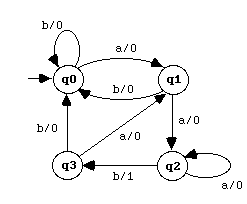
Finite State Transducers are typically useful in NLP (Natural Language Processing) research.

TransDiagram

(a | b)* aab

Completes on output of 1

Normal Non-deterministic Finite State Automata (NNFA)

A normal NFA (abbr. NNFA) is an NFA in which all edges leading into the same state have the same label. Thus, it is convenient to label states instead of edges. Visually this has a strong correpondence with the language is recognises.

NNFA-small

(a | b) * abb

Compressed Normal Non-deterministic Finite State Automata (CNNFA)

http://www.cs.nyu.edu/web/Research/Theses/chang_chia-hsiang.pdf

CNNFA

(a | b) * abb


Comparison between NFAs and DFAs

NFAs are more compact – they generally require fewer states to recognize a language.

It obvious that a DFA can be simulated with an NFA, because the set of all DFAs is a subset of the set of all NFAs. (Proof)

Its less obvious that every NFA can be simulated with a DFA, and NFA has an equivalent DFA. It is possible to convert an existing NFA into a DFA for the purpose of implementing a simpler machine. This can be performed using the powerset construction which may lead to an exponential raise in the number of necessary states. Such determinization however is necessary to build a complement automaton.

[UPDATE] – corrected an image that I mixed up when resizing them. The First NFA image was a repeat of the DFA.


Posted in MetaWrap Server, Parsing Theory | 7 Comments